Dexterr — Every contact, deal and conversation in one workflow.
14 days of Pro · no card
Live demo · sample data
This is the real product on sample data. Add up to 5 records of your own, then create a free account to keep going. Nothing you do here is sent to a server.
- 14
- days of every Pro feature, free
- 7
- things a workflow can react to
- 6
- things a workflow can do
- 20 MB
- per file you attach to a record
Row-level tenant isolation
The database itself keeps workspaces apart
Two-factor sign-in
Authenticator app with recovery codes
Audit log
Who changed what, and when
Export and erasure
Your data leaves when you ask
Roles by module
Full, own, view or none, per team
Most CRMs ask your team to feed them. Dexterr hands the busywork to workflows and keeps the story on the record.
What it does
One workflow from first contact to signed quote.
These are screenshots of the product, not mock-ups.
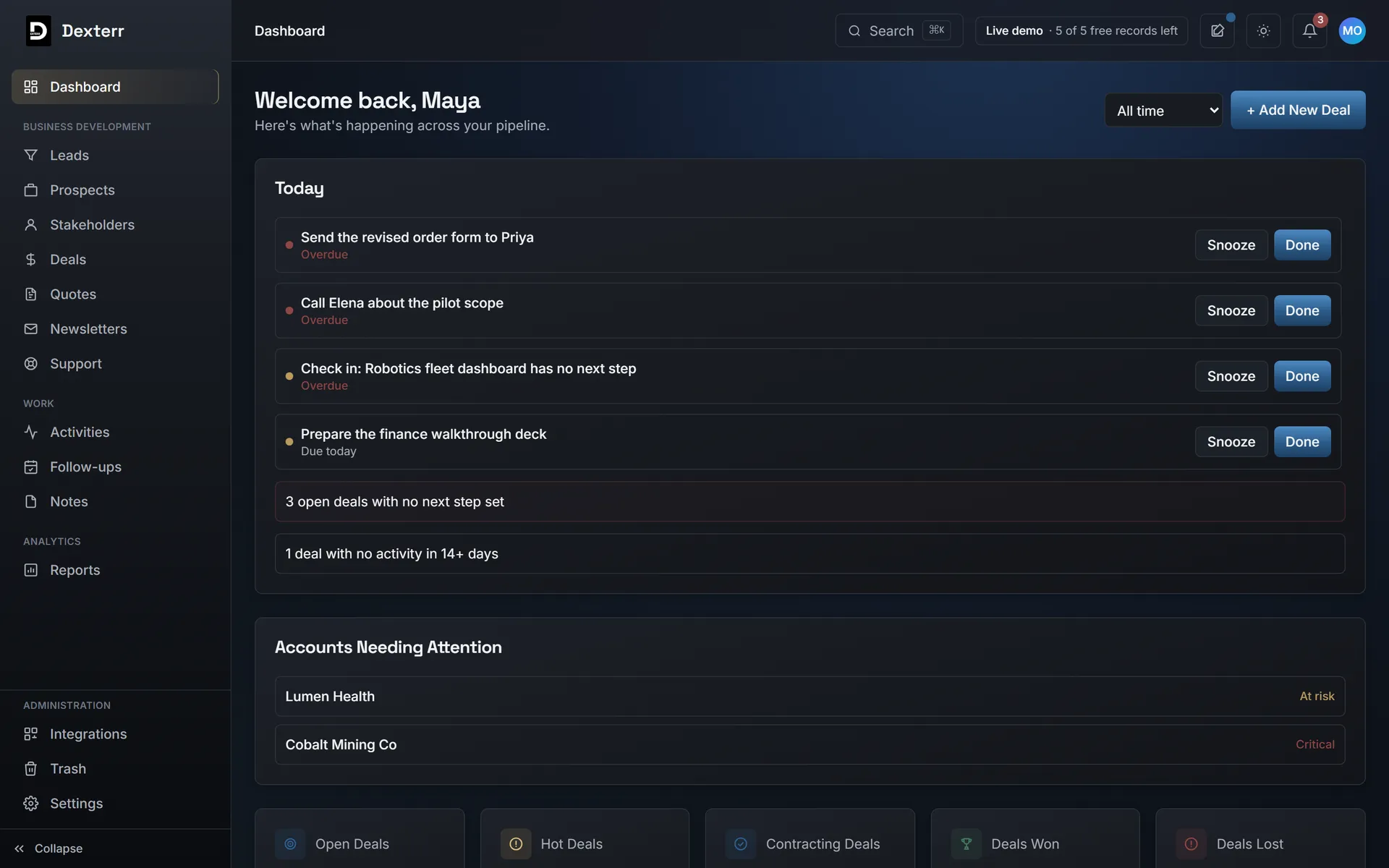
Dashboard
Open it and know what needs you today.
Overdue follow-ups, tasks due today and deals with no next step sit at the top. Accounts that need attention are listed by health, and pipeline totals are one glance away.
- Follow-ups you can snooze or finish in a click
- Accounts flagged as at risk or critical
- Pipeline value, hot deals and wins at a glance
Every plan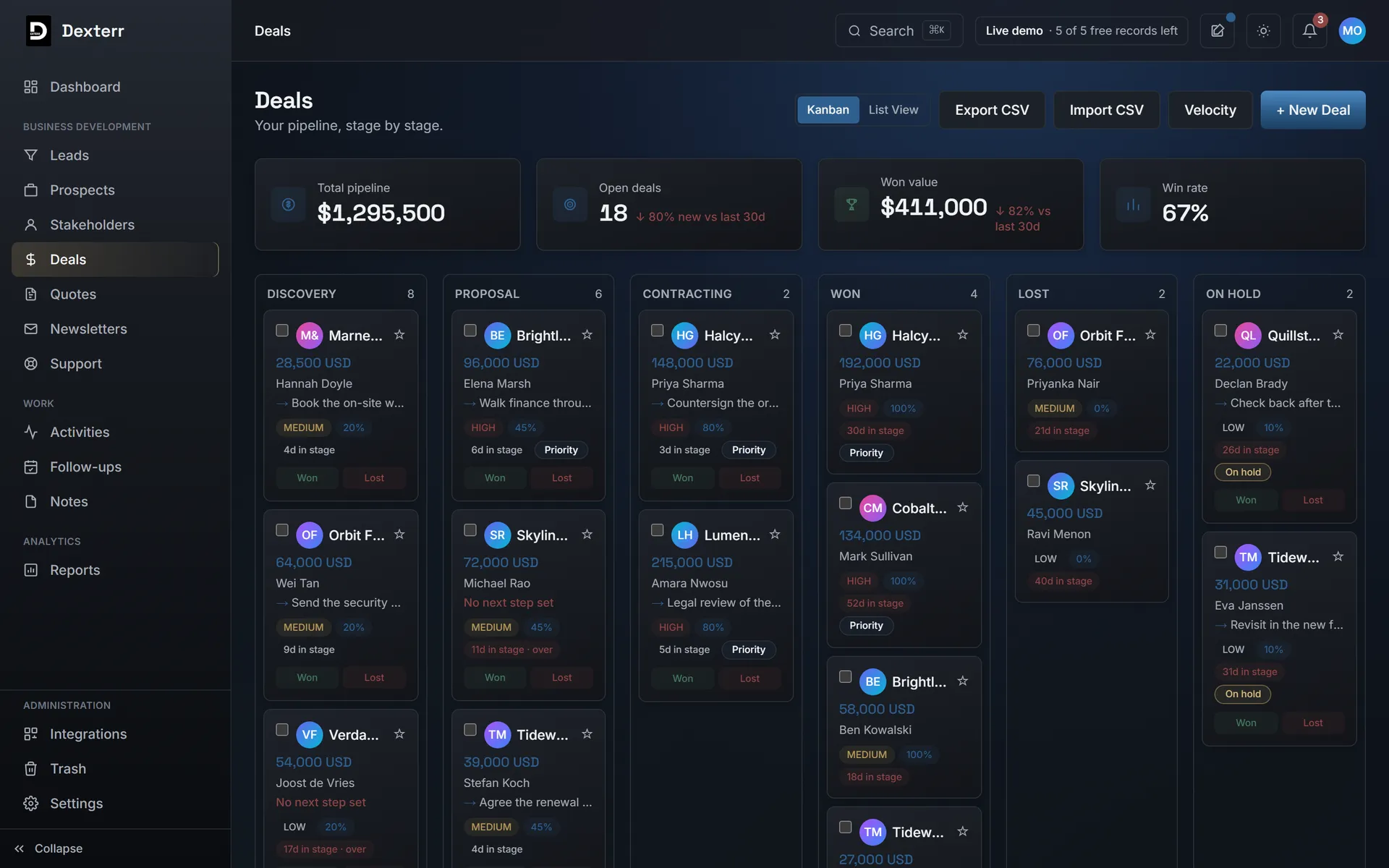
Pipeline
A pipeline you can run with a drag.
Move deals between stages and the probability follows the stage. Cards show how long a deal has sat, who owns it and what has gone stale, so slow deals are obvious before they are lost.
- Guidance and expected time on every stage
- Stale and over-time badges on cards
- Board, list view and a velocity view
Every plan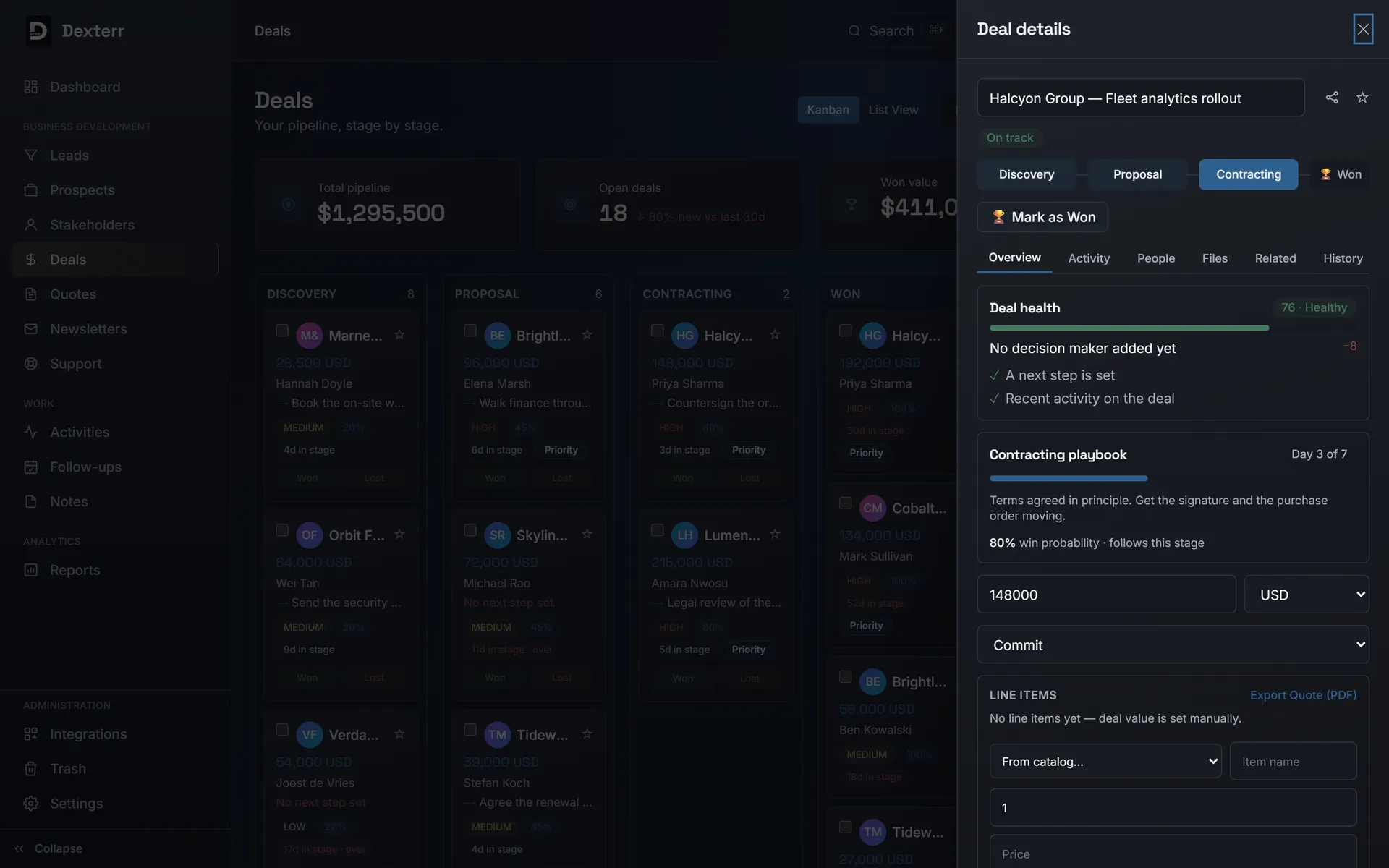
Deals
Everything about a deal, in one place.
Buyers by role, line items, quotes, files, notes and history live in one drawer. The health score lists the reasons behind it, so you can see what to fix instead of guessing.
- Champion, decision maker and blocker on every deal
- Line items with discounts and tax
- A health score that explains itself
Every plan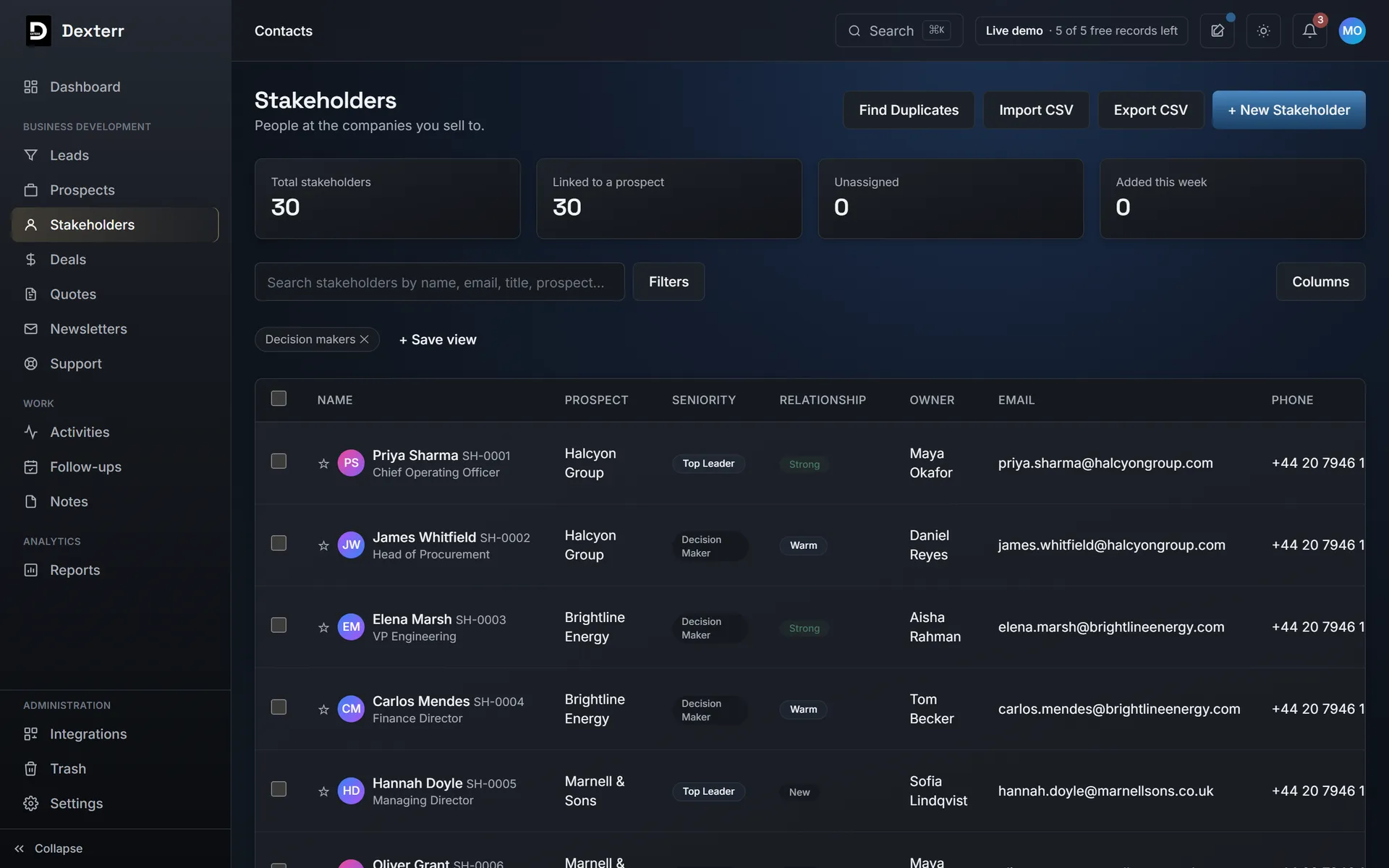
Stakeholders and prospects
Tables that work like a spreadsheet, without the mess.
Filter by anything, save the view you keep coming back to, choose your columns and export what you see. Duplicates are found and merged instead of piling up.
- Saved views and a column picker
- Duplicate finder with merge
- CSV import with column mapping, and CSV export
Every plan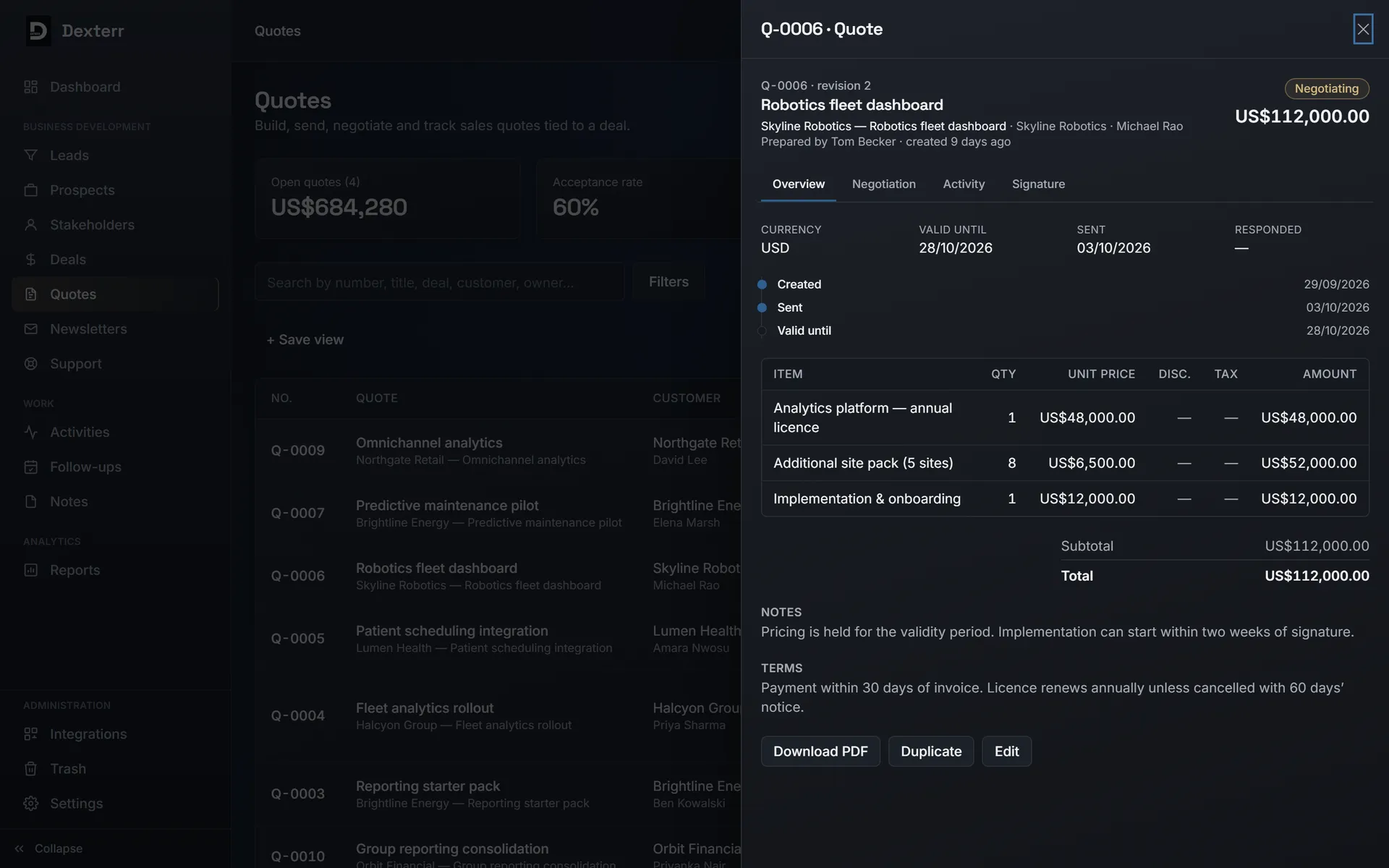
Quotes
Quotes your buyer can answer online.
Send a private link. Your buyer comments, asks for a change to a line, or approves. Each accepted change becomes a revision, and both sides’ steps are kept in a log that detects tampering.
- Revisions with a clear before and after
- Client links that expire and can be revoked
- The deal moves along with the quote
Every plan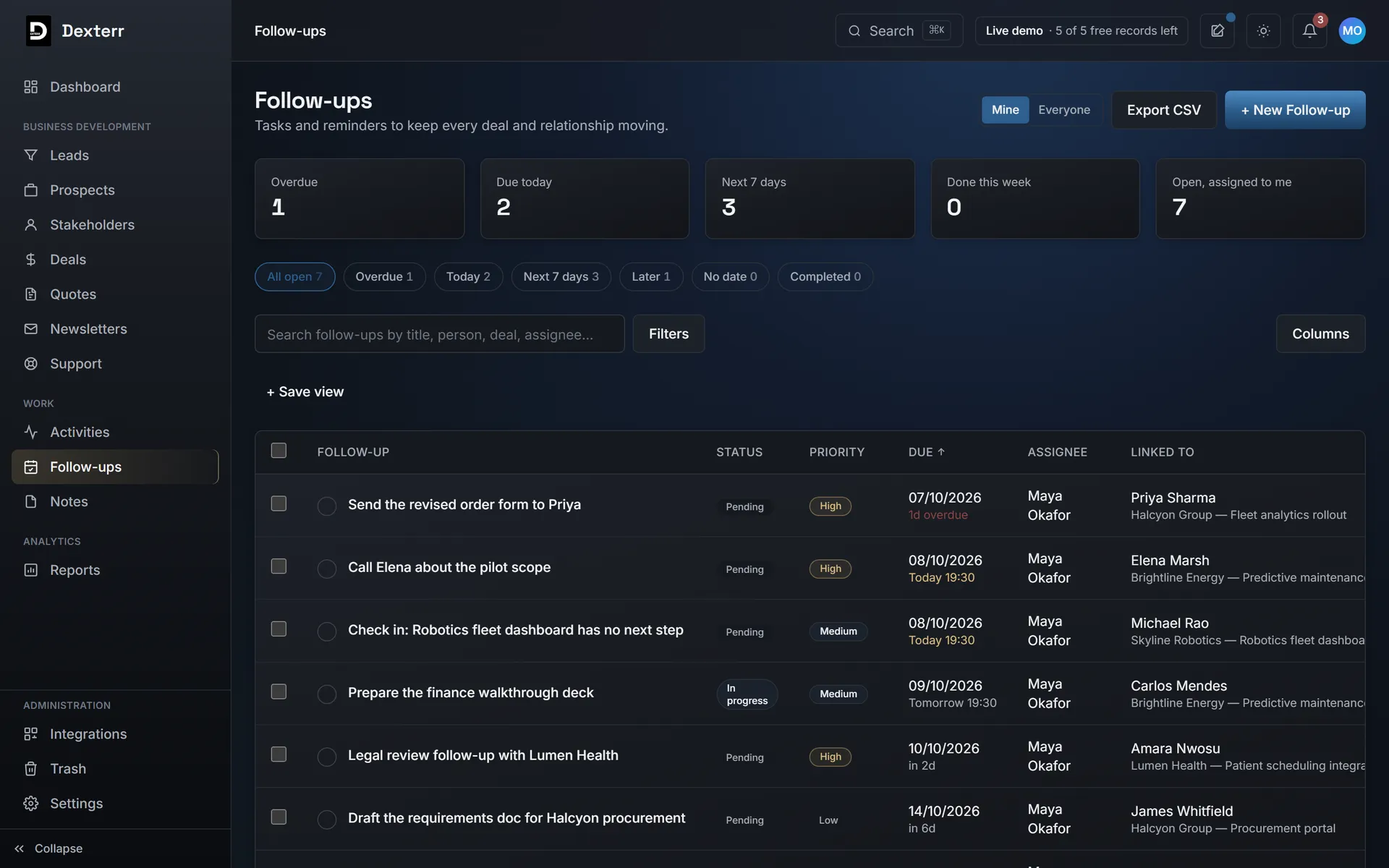
Follow-ups
Follow-ups nobody has to remember.
Tasks are grouped into overdue, today and coming up, with the stakeholder and deal one click away. Workflows add tasks when a deal moves or a quote is sent, and mark them as automatic so you can tell.
- Snooze presets and bulk actions
- Automatic tasks are labelled
- Linked straight to the record
Every plan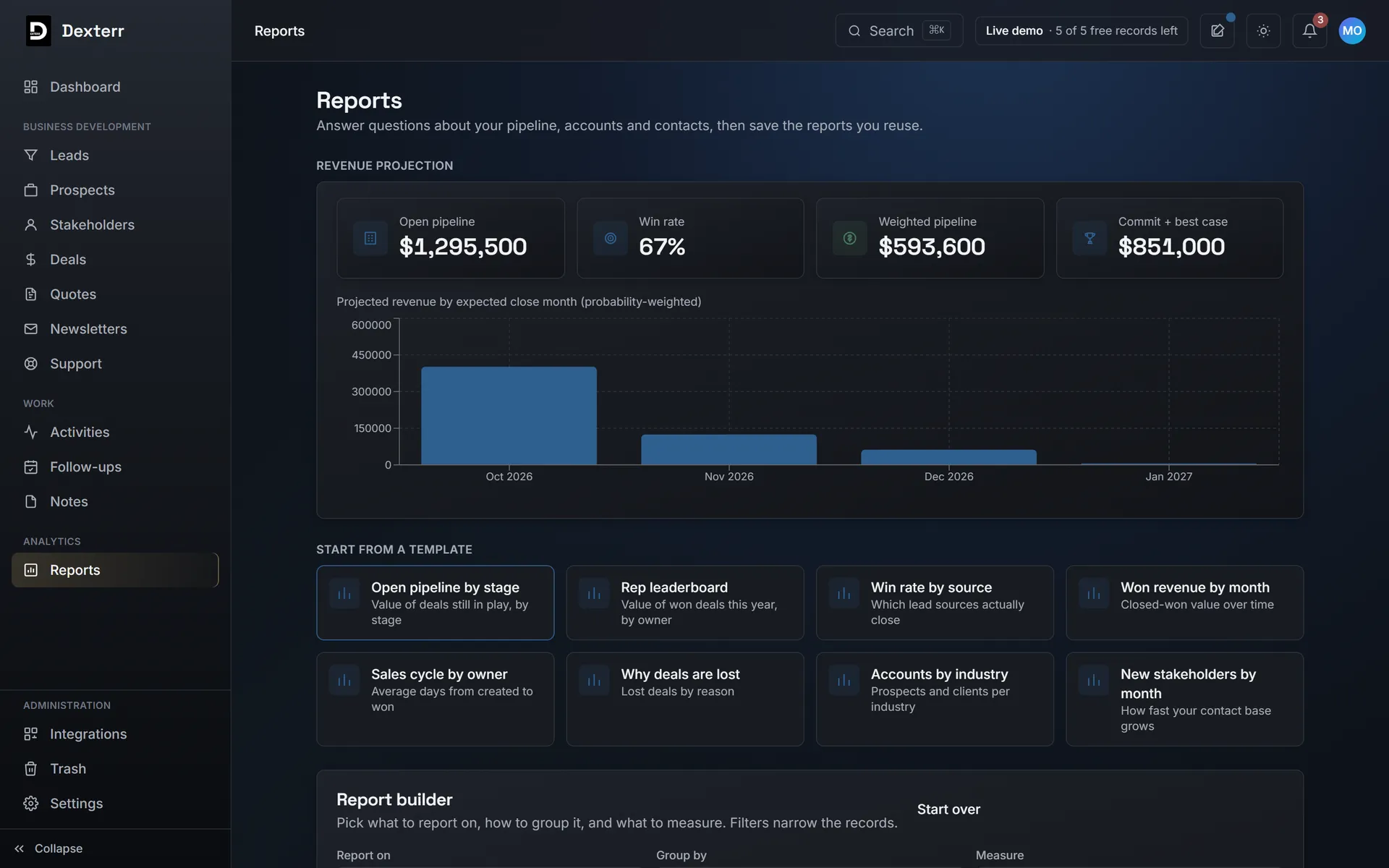
Reports
Answers, not just lists.
Build the report you actually need, save it and rerun it. Group deals by owner, stage, source or month and measure value, win rate or days to win, then click a bar to see the records behind it.
- Filters, date ranges and three chart types
- Saved reports and CSV export
- Pipeline projection by expected close month
Pro
The details
The small things that add up.
Each one is a real feature, drawn small. Go on, press something.
Deal health, with the reasons
A score from the next step, recent activity, who is on the deal and how long it has sat in stage. Every point is explained.
A quote you can follow
Draft, sent, negotiating, approved, signed. Each change is a revision.
Stage requirements
Ask for a next step, a checklist or a buyer role before a deal moves on.
Views you can save
Filter by seniority, owner, follow-up date or tag, and keep the view for next time.
Duplicates, merged
See a similarity score, then choose which value to keep.
Snooze, not lose
Push a follow-up a day, three days or a week.
Newsletters that respect consent
Opted-in contacts only, an unsubscribe link in every email, and click counts without invasive open tracking.
Import in minutes
Map your CSV columns, see likely duplicates before they are created, and tag the batch.
Solutions
Set up the way your team already talks.
Rename the records, name the stages, add the fields you need. The CRM adapts to your sales process, not the other way round.
The problem
Leads in one tool, quotes in another, and follow-ups in someone’s head.
Stakeholders, prospects and deals share one pipeline. Quotes go out from the deal, and a follow-up appears when one is sent.
Your records are called
Example automation
Discovery
Proposal
Contracting
Won
Example stages. Every stage is yours to name and order.
Automation
The busywork happens without you.
Workflows react when a deal moves, goes quiet or a quote changes. They create the task, tell the right person, update a field or call a webhook, and they label what they did so the record still tells the story.
Overdue tasks get reminders and quotes that pass their date expire on their own.
- Triggers
- 7
- Actions
- 6
- Sent quote Q-0007 to ElenaYou
- Created a task: follow up in 3 daysWorkflow
- Elena opened the quoteBuyer
- Notified you that it was viewedWorkflow
- Elena approved the quoteBuyer
- Created a task: prepare the contractWorkflow
Build one yourself
Click a trigger on the left and an action on the right, then run it.Pick what happens, pick what should follow, and run it.
When
Then
When
Quote Q-0007 sent to Elena Marsh
Then
Create a task
Security and trust
Your pipeline is sensitive. It is treated that way.
Workspaces are walled off
Every record carries your workspace’s id and the database enforces row-level security, so one customer’s query cannot read another’s rows.
Two-factor sign-in
Turn on an authenticator app for your team, with recovery codes for the day a phone goes missing.
An audit trail
Owners, admins and managers can see who changed what and when. Platform staff can enter a workspace only for support, in a marked session that is logged.
Your data is yours
Export a workspace, delete records for good, or erase an account. Export still works when a trial has ended.
Who sees what
Choose a role. These are the defaults, and an Owner can change any cell.
Works leads, deals and quotes. Sees prospects and stakeholders but does not edit them. No settings.
| Role | Leads | Prospects | Stakeholders | Deals | Quotes | Reports | Settings |
|---|---|---|---|---|---|---|---|
| Admin | Full | Full | Full | Full | Full | Full | Full |
| Manager | Full | Full | Full | Full | Full | Full | View |
| Sales rep | Full | View | View | Full | Full | View | None |
| Account manager | View | Full | Full | View | Full | View | None |
| Operations | None | None | None | None | None | View | Full |
- Dashboard
- Leads
- Prospectsview only (view only)
- Stakeholdersview only (view only)
- Deals
- Quotes
- Reportsview only (view only)
- Settings (no access)
Pricing
Flat monthly prices. Every Pro feature free for 14 days.
Prices are per workspace, not per seat, and billed monthly.
Starter
$29/ month
- 3 team members
- 500 stakeholders and 500 deals
- Core CRM, quotes and follow-ups
- Quotes with a private client page
- Email support
Pro
$99/ month
Everything in Starter, plus:
- 15 team members
- Unlimited stakeholders and deals
- Reports and the report builder
- Public API and webhook actions
- Priority email support
No card needed. Cancel by doing nothing.
Custom
Custom
- Unlimited team members
- Unlimited stakeholders and deals
- Reports and the report builder
- Public API and webhook actions
- Dedicated support
Questions
The short answers.
There is no single best CRM. The best one is the one your team will actually use, and that depends on your sales process, team size and budget. For a small business that sells to other businesses, look for a clear pipeline, quotes, follow-up reminders, simple pricing and an easy import from your spreadsheet.
Dexterr is built for that case: stakeholders, prospects, deals, quotes with client approval and follow-ups in one workflow, flat monthly pricing for the whole workspace, and a 14-day trial with every Pro feature. It is not the right fit if you need two-way email or calendar sync today, because those are not built yet. Try the live demo on the home page and judge it yourself.
Dexterr is a CRM for teams that sell to other businesses. Stakeholders, prospects, deals, quotes, follow-ups and reports live in one connected workflow, so nobody has to rebuild the picture from spreadsheets and inboxes.
It suits sales teams, consultancies, agencies, staffing firms and any small or mid-sized team that wants a pipeline shaped around how it actually works.
Create a workspace and every Pro feature is switched on for 14 days. No card is needed. You can import your data, invite your team and build your pipeline.
When the 14 days are up you choose a plan. If you do not, the workspace becomes read-only and nothing is deleted.
No. The limits are enforced on the server, not just hidden in the interface. Reports, webhook actions, API access and the higher limits are refused for a Starter workspace even if someone calls the API directly.
Locked items stay visible with a padlock, so you can see what upgrading unlocks.
Import from a CSV file. You map your columns to Dexterr fields, and likely duplicates are flagged so you do not create them twice. Stakeholders and prospects both have an importer, and you can tag everything from one import to find it later.
Put your pipeline in one place.
Start a 14-day trial with every Pro feature. No card, and your data stays yours if you leave.